
User guide - Kudo
Buy NowThis theme is delivered with a theme plugin and NopAdvance Core plugin, and both plugins must be installed in order for this theme to work properly.
Please see the plugin installation guide before proceeding with the theme setup. We recommend configuring the theme plugin before you select Kudo as your store working theme.
Once the theme plugin has been installed, navigate to NopAdvance > Themes > Kudo in your nopCommerce admin menu, as shown in the below image.
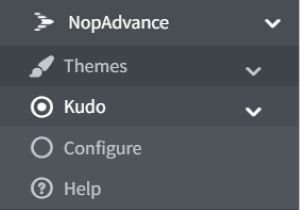
Clicking on the Configure menu item will redirect you to the plugin configuration page as displayed below.
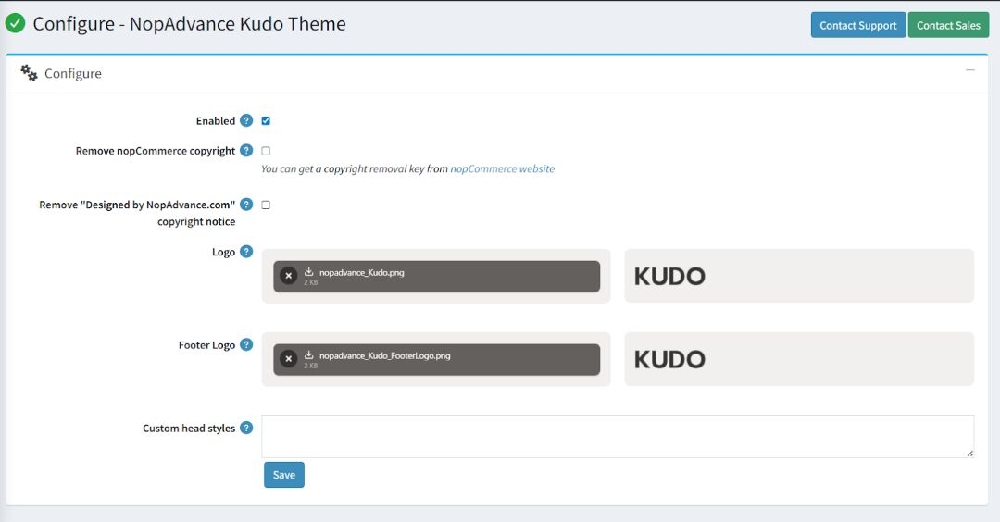
The settings from the configuration page are explained below:
- Enable: Check to enable the plugin for your nopCommerce store. Please note, some theme features may not work properly unless the plugin is enabled for the store where this theme is being used.
- Remove copyright: Check to remove the nopCommerce copyright notice only, if you have already purchased a copyright removal key from here and adhere to the nopCommerce license terms.
- Remove "Designed by NopAdvance.com" link from the footer: Check to hide developer credits for NopAdvance in your website footer.
- Logo: Define the store logo.
- Custom head styles: Write any custom styles (CSS) to apply to the theme. This is intended for developers and advanced users.
Configure Footer Column 2
The Footer Column 2 configuration in the nopCommerce theme allows store owners to display important menu titles or helpful links in the footer section of the website. This helps customers easily find ways to connect with the store.
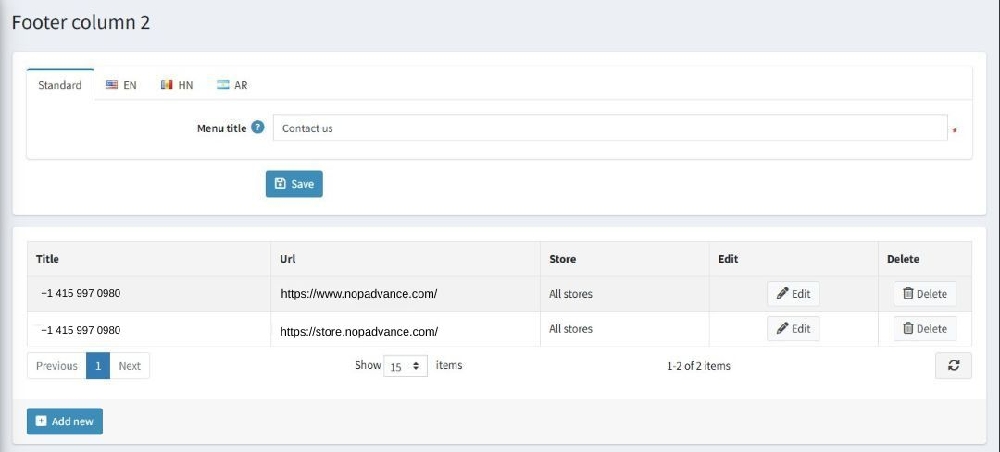
Key features shown in the configuration:
- Menu Title Customization: You can define the heading for this footer section using the Menu title field. In the example, the title is set as “Contact us”, which will appear as the heading of the second footer column on the storefront.
- Multi-language Support: The configuration supports multiple languages such as EN, HN, and AR, allowing store owners to translate the footer title based on the selected store language.
- Add Multiple Contact Entries: The table section allows administrators to add multiple items such as phone numbers, contact links, or support pages that will appear under the footer column.
- Title and URL Mapping: Each item contains:
- Title – The text displayed in the footer (for example, a phone number).
- URL – The link that opens when a user clicks the item.
- Store Mapping Support: The Store column indicates whether the footer item is assigned to all stores or a specific store in a multi-store setup.
- Edit and Delete Controls: Administrators can easily edit existing entries or remove them using the Edit and Delete options available in the table.
- Add New Contact Items: The Add new button allows store owners to quickly add additional contact numbers, links, or other support information to the footer.
This configuration makes it simple to manage and update any important information in the footer, ensuring customers always have quick access to important communication details.
Note:
- All settings support multi-store configuration.
- Features of this plugin will only work with the Kudo nopCommerce theme from NopAdvance.