
Installation and configuration - Child Coupon Discount
Buy NowThe Child Coupon Discount Management plugin allows store owners to create multiple coupon codes from a single nopCommerce discount. Each coupon can be shared with different customers or used for different promotions, while still following the same discount rules. This makes it easy to manage offers, track coupon usage, and run marketing campaigns without creating multiple discounts.
With this plugin, each child coupon works under a parent discount and follows its rules and limits. Customers can apply the child coupon code in the shopping cart, and the coupon usage is counted only after the order is successfully placed. This ensures accurate tracking and prevents misuse while keeping all limits based on the parent discount.
This solution is perfect for marketing campaigns, targeted offers, bulk coupon sharing, and tracking the performance of individual coupon codes, all while using a single discount setup.
Installation and Configuration
This theme is delivered with a theme plugin and NopAdvance core plugin. Core plugin and the theme plugin must be installed in order for this theme to work properly. For that, you need to install the plugin while proceeding with the setup process.
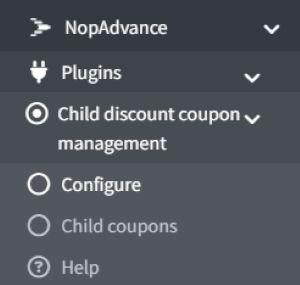
Once the plugin has been installed, you will see the menu under NopAdvance > Plugin> Child Discount Coupon Management in your nopCommerce admin menu, similar to the image below.
Multi-store Configuration
If your nopCommerce site has more than one store, this dropdown lets you choose which store the plugin settings should affect.
- Select a specific store → settings only apply to that store.
- Select "All stores" → settings apply to every store in your setup.
It’s basically a way to control plugin behavior per store or for all stores at once.
Enabled Option
This checkbox controls whether the plugin is active/inactive.
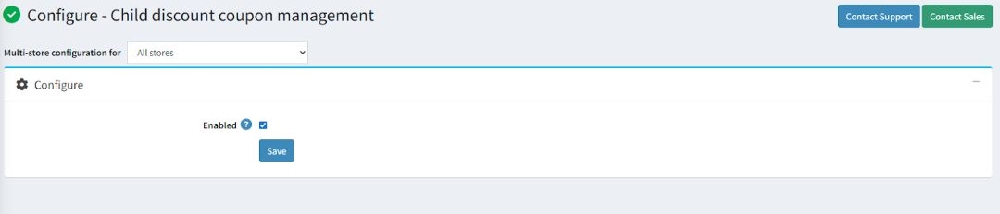
After configuration setting, under NopAdvance → Plugins → Child Discount Coupon Management > Child Coupons, the child coupons configuration screen allows you to control the basic functionality of the plugin. As shown in the below screenshot.
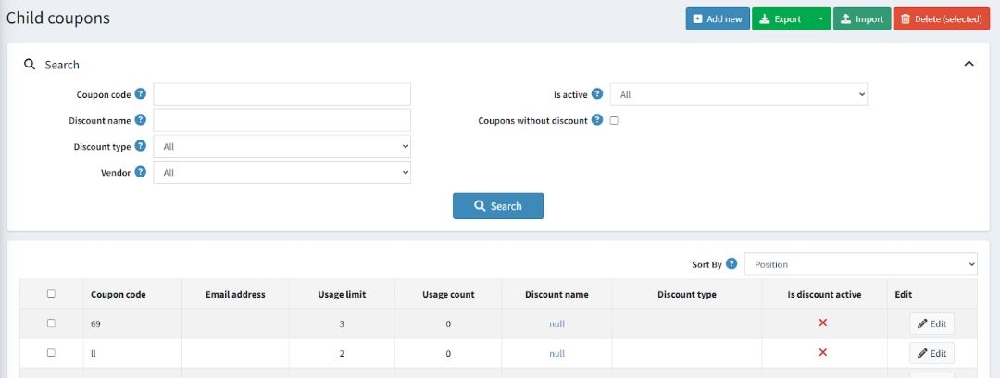
The Child Coupons tab is to manage all child coupon codes created under a parent discount. It allows administrators to search, create, track, and control coupon usage from a single page.
Top Action Buttons
- Add New → Create a new child coupon code.
- Export → Download coupon data for reporting or backup.
- Import → Upload multiple coupons at once (bulk upload).
- Delete (Selected) → Remove selected coupons.
Search Section
This section allows administrators to find specific child coupons quickly by using filters such as coupon code, status, or validity dates.
- Search by Coupon Code, Discount Name, Discount Type, or Vendor.
- Its Active filter shows active/inactive coupons.
- Coupons without discount identify coupons not linked to any discount.
- Click Search to display filtered results.
Coupon List Table
This grid shows coupon details such as:
- Coupon code
- Associated email (if assigned)
- Usage limit and usage count
- Linked discount name and type
- Discount active status
- Edit option to modify coupon details.
Sorting Option
The Sort By dropdown allows organizing coupon records based on position or other criteria.
Add new child coupon
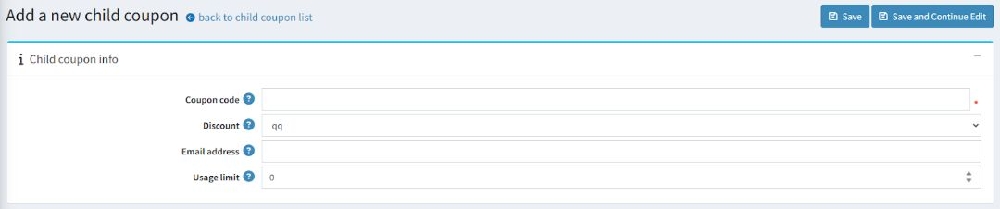
Coupon Code
- Enter the unique code customers will use at checkout.
- Each code must be unique to ensure proper tracking and avoid conflicts.
Discount
- Select the parent discount from the dropdown list.
- The child coupon will apply this selected discount when used.
- The child coupon will apply this selected discount during the checkout process.
Email Address
- Optionally assign the coupon to a specific customer email.
- Useful for targeted promotions or personalized offers.
- Ensures the coupon is redeemable only by that customer, ideal for personalized or targeted promotions.
Usage Limit
- Defines how many times the coupon can be used.
- Example:
- Any number → Limits how many times it can be redeemed.
Add New Child Coupon - Additional Note
When creating a child coupon, its usage is also dependent on the parent discount limits.
Parent Discount Dependency
- If the parent discount has a usage limit, the child coupon will only work within that limit.
- Even if the child coupon has remaining usage, it will stop working once the parent discount limit is reached.
Edit Child Coupon
- Admin can edit all details such as Child Coupon, Discount, Email Address, and Usage Limit.
- A URL with coupon code is a special link that automatically applies a discount or promotion when a customer clicks it. Instead of entering the coupon code manually at checkout, the code is embedded in the link.