
Customer workflow - Child Coupon Discount
Buy Now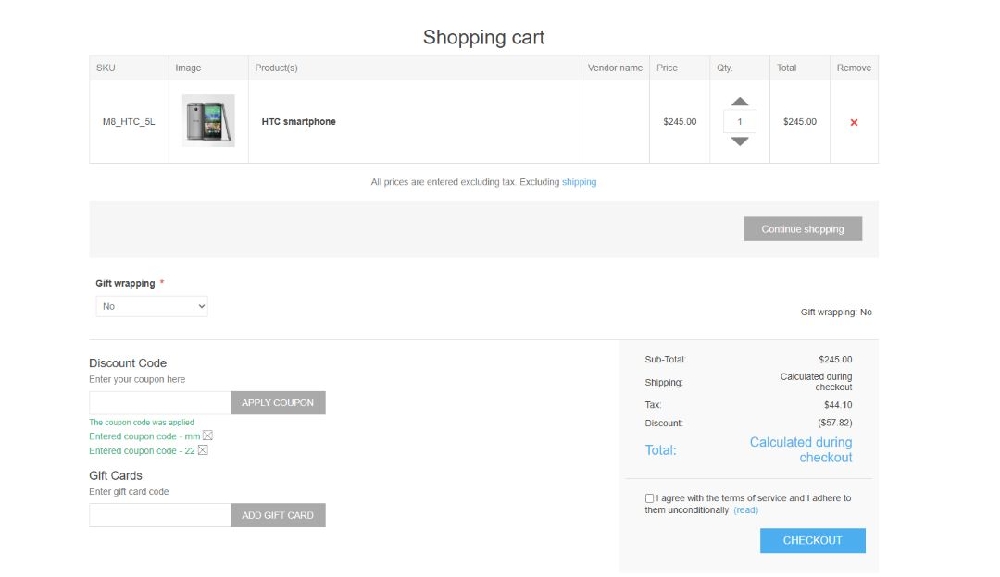
Applying a Coupon Code
- Customers enter the child coupon code in the Discount Code field.
- Click Apply Coupon to activate the discount.
OR
- Coupon can be applied automatically using the promotional child coupon URL
Coupon Confirmation
- A success message appears indicating the coupon has been applied.
- Applied coupon codes are displayed below the input field.
- Customers can remove a coupon if needed.
Discount Calculation
- The discount amount is reflected in the cart summary section.
- The discount amount is shown in the cart summary or on the product, based on the parent discount type
- Final totals are recalculated during checkout, including tax and shipping if applicable.
Important Behavior
- Child coupons work only if:
- The linked parent discount is active.
- Usage limits (parent and child) are not exceeded.
- Coupon validity conditions are satisfied.
- When multiple child coupon codes are applied on the storefront, their behavior depends on the parent discount setting.
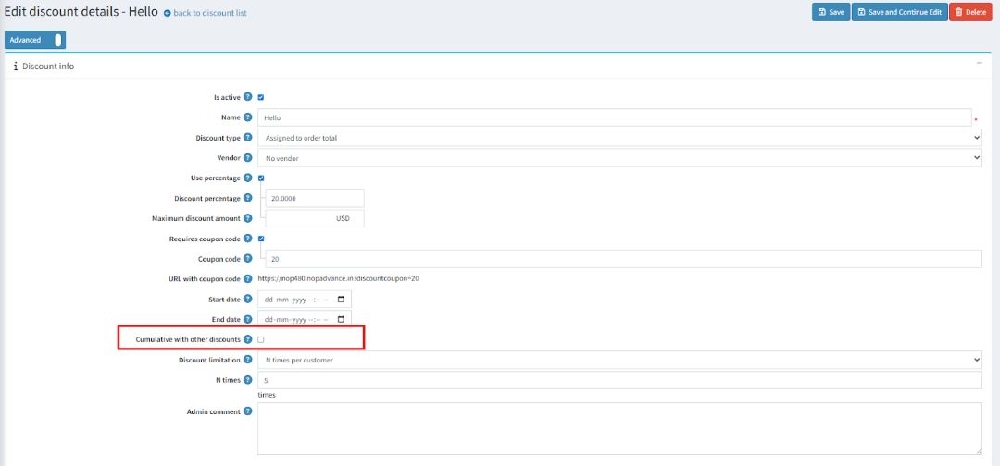
Cumulative with Other Discounts
Multiple child coupons can be applied together on the storefront only when the parent discount type is the same, and behavior also depends on settings like ‘Cumulative with other discounts,’ which allows combining with other active discounts.
✔ Enabled (Checked) ( Parent discount type is same.)
- Multiple coupons can be applied together.
- Discounts from different child coupons will combine.
- Customers can receive multiple discount benefits in the same cart.
❌ Disabled (Unchecked)
- Only one child coupon or parent discount can be applied at a time; if cumulative is disabled, the highest discount or child coupon of the same type is applied.
Important Note
- Child coupons follow the rules defined in the parent discount.
- If cumulative discounts are disabled in the parent discount, multiple child coupons cannot be applied simultaneously.
Scenario | Default nopCommerce Coupon | Child Coupon Plugin |
| Single Coupon Creation | One discount = one coupon code | One parent discount with multiple child coupon codes |
| Bulk Coupon Creation | Manual creation required for each coupon | Bulk child coupons can be created/imported easily |
| Usage Limit Control | Only discount-level usage limit | Parent limit + individual child coupon limit |
| Parent Limit Effect | Discount stops when limit reached | Child coupon stops if parent limit finished (even if child limit left) |
| Email Specific Coupon | Limited / custom setup required | Child coupon can be assigned to specific email |
| Coupon Tracking | Tracks discount usage only | Tracks each child coupon usage separately |
| Campaign Management | Difficult for multiple codes | Easy campaign-wise coupon management |
| Coupon Editing | Edit each dis count separately | Central grid to manage all child coupons |
| Import / Export Coupons | Not standard | Supported (bulk management) |